
Ever feel like your weekly or monthly reports drain hours of your life that you’ll never get back? You’re not alone. Every business owner, manager, or team lead eventually hits the same wall: too much data, too little time, and absolutely no energy to manually stitch it all together.
Here’s the good news: you can reclaim your time, sharpen your insights, and run smoother operations when you put AI for business operations at the center of your reporting process.
This guide breaks down exactly how AI reporting tools work, why they matter, and how you can plug them directly into your weekly and monthly dashboards to make smarter decisions faster.
Why Every Business Needs AI for Business Operations Today
AI stopped being a “nice-to-have” a long time ago. Right now, it’s a competitive advantage you simply can’t ignore.
When you integrate AI for business operations, you instantly streamline your entire reporting ecosystem. Instead of scrambling every week or month to crunch numbers, clean spreadsheets, or decode trends, AI does it for you automatically.
AI tools don’t just collect data; they:
- Analyze your metrics in real time
- Identify trends you normally miss
- Predict future outcomes
- Generate presentation-ready reports
- Give you plain-English insights you can act on today
Bottom line? AI transforms your business from reactive to proactive.
What AI Reporting Tools Actually Do (And Why They’re Game-Changing)
AI tools reshape your reporting process from top to bottom. If you’ve relied on manual dashboards or spreadsheets, here’s what modern AI tools add on top:
1. Automated Data Gathering
AI pulls data from all your sources CRM, marketing platforms, website analytics, operations trackers, sales dashboards without manual copy-paste nonsense.
You get clean, accurate numbers every time.
2. Smart Analytics That Read Between the Lines
AI catches patterns humans overlook because it analyzes millions of data points at once.
For example:
- Sudden drop in conversions?
AI explains why and suggests how you can fix it. - Slow operations in one department?
AI identifies the bottleneck instantly. - Rising churn?
AI predicts it before it hits your numbers.
3. Predictive Insights
Instead of waiting for the month-end report, AI forecasts what’s coming next.
Prediction = Preparedness.
4. Auto-Generated Weekly and Monthly Reports
You tell the AI what format you like Google Docs, Notion pages, PDFs, dashboards and it builds the entire report for you.
Charts?
Summaries?
Actionable recommendations?
Done.
5. Plain-English Explanations
Not everyone loves data. AI translates complex KPIs into simple insights your entire team understands.
No jargon. No confusion. Just clarity.
How AI for Business Operations Boosts Weekly Reporting
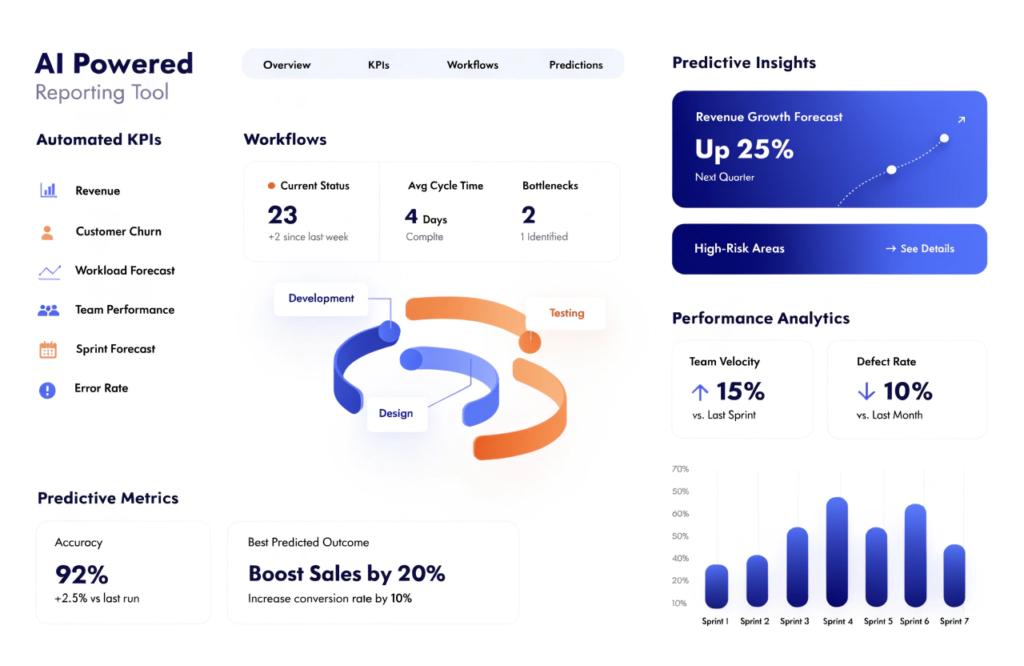
Weekly reports keep your team aligned, and AI makes them sharper and faster.
Here’s what AI does every week with zero extra work from you:
1. Identifies Short-Term Wins and Losses
AI spots quick performance spikes or dips, so you adjust instantly instead of waiting for month-end surprises.
2. Flags Operational Issues
If your systems slow down, your leads drop, or your customer response times increase, AI alerts you before it turns into a bigger problem.
3. Tracks Team Productivity
AI measures:
- Completed tasks
- Response times
- Project progress
- Workload distribution
It ensures your team stays balanced, efficient, and aligned.
4. Suggests Weekly Actions
AI doesn’t just say what happened—it tells you what to do next.
You’ll see recommendations like:
- “Improve onboarding workflows to reduce churn by 12%.”
- “Allocate more budget to high-performing campaigns.”
- “Automate repetitive tasks to save 4+ hours weekly.”
5. Creates Snapshot-Ready Summaries
You can drop AI-generated weekly highlights directly into Slack, Notion, Teams, or your weekly standup deck.
How AI for Business Operations Enhances Monthly Insights
Monthly insights give you the bigger picture performance, revenue, growth, marketing ROI, operational efficiency, and more. AI handles the heavy lifting.
1. Builds Deep-Dive Monthly Dashboards
AI compiles:
- KPIs
- Revenue trends
- Customer behavior
- Team performance
- Workflow bottlenecks
- Operational costs
- Forecasts
—all in one place.
2. Measures Month-over-Month Progress
You instantly see:
- What improved
- What declined
- Why it happened
- What to fix next
This keeps your strategy sharp every single month.
3. Predicts the Next 30–90 Days
AI forecasts:
- Sales
- Traffic
- Lead flow
- Customer churn
- Operational load
- Resource needs
You get ahead of problems instead of reacting to them later.
4. Generates Executive-Ready Reports
Need something you can hand to your CEO, investors, or board?
AI summarizers create clean, formatted monthly reports in seconds.
5. Recommends Long-Term Strategies
AI doesn’t just handle data it guides growth.
You’ll see suggestions like:
- “Shift budget to these 3 high-ROI channels.”
- “Automate this workflow to reduce costs.”
- “Reassign these tasks to improve team efficiency.”
What to Look For When Choosing AI Reporting Tools

Not all AI tools deliver equal value. If you want maximum ROI, look for these features:
1. Multi-Source Data Integrations
Your AI tool must connect to:
- Google Analytics
- CRM tools
- Email marketing platforms
- Project management tools
- Finance dashboards
- Operations tools
- Sales pipelines
More integrations = fuller insights.
2. Natural Language Insights
Your reports should sound like a human wrote them clear, simple, and actionable.
3. Predictive Analytics
This is where AI stands out. If your tool doesn’t forecast outcomes, you’re missing half the value.
4. Customizable Dashboards
Every business is different. Your dashboard should be too.
5. Automated Scheduling
Your weekly and monthly reports should land in your inbox automatically no manual setup.
6. Collaboration-Friendly Features
Your team should leave comments, ask questions, and edit reports directly.
7. Strong Security
If the tool doesn’t protect your data, skip it.
10 Powerful Use Cases: How AI for Business Operations Transforms Reporting
AI unleashes value across your entire company. Here’s how businesses actually use it:
1. Marketing Teams
- Monitor traffic trends
- Measure campaign ROI
- Track ad performance
- Predict next month’s results
2. Sales Teams
- Forecast revenue
- Track pipeline health
- Identify top-performing reps
- Spot conversion bottlenecks
3. Customer Support
- Track support ticket volume
- Measure resolution speed
- Identify recurring customer issues
4. HR & People Management
- Track hiring progress
- Predict staffing needs
- Measure team workload
5. Finance Teams
- Automate monthly closings
- Forecast cash flow
- Track spending patterns
6. Operations Departments
- Monitor process efficiency
- Identify workflow bottlenecks
- Track output and performance
7. Product Teams
- Analyze user behavior
- Track feature adoption
- Predict churn risks
8. Executive Leaders
- Get a full snapshot of the company
- Read insights in plain English
- Make decisions backed by data
How to Integrate AI Reporting Into Your Business in 7 Simple Steps
You don’t need to overhaul your systems. Follow this roadmap:
- List your KPIs — choose the numbers that matter most.
- Audit your current data sources — CRM, marketing tools, finance, operations.
- Select an AI platform — choose one with strong integrations.
- Connect all your tools — let AI pull everything in one place.
- Build your dashboards — weekly and monthly.
- Enable automated reporting — email, Slack, or PDF delivery.
- Review and adjust — optimize your dashboard monthly.
When you wrap AI around your operations, you save time, reduce errors, and make smarter decisions.
Final Thoughts: AI for Business Operations Is Now a Growth Superpower
If you want cleaner data, sharper insights, and faster decision making, you need AI reporting tools working behind the scenes every single week and month.
When you put AI for business operations at the center of your reporting workflow, you:
- Eliminate manual work
- Increase accuracy
- Improve team alignment
- Boost productivity
- Unlock predictive insights
- Strengthen your entire strategy
The future belongs to businesses that use AI not as an add-on, but as the backbone of their reporting and operations.
So start now. Automate your reports. Free your time. Grow your business with precision and clarity.
FAQs About AI for Business Operations and Reporting Tools
1. What is AI for business operations?
AI for business operations uses artificial intelligence to automate data collection, analyze trends, generate insights, and produce weekly and monthly reports that help companies make faster, smarter decisions.
2. How do AI reporting tools save time?
AI reporting tools eliminate manual data gathering, create dashboards automatically, summarize insights in plain English, and generate presentation-ready reports in seconds. You save hours every week.
3. Can small businesses use AI reporting tools?
Yes. Small businesses benefit the most because AI handles analytics, reporting, and insights without hiring extra analysts or wasting time on spreadsheets.
4. What kind of reports can AI generate?
AI creates weekly, monthly, and quarterly reports for marketing, sales, operations, finance, HR, and product teams. It explains KPIs, trends, predictions, and next steps clearly.
5. Does AI replace human decision-making?
No. AI for business operations enhances human decisions by providing accurate data, forecasts, and recommendations. You stay in control; AI simply speeds up insight generation.
6. How accurate are AI-based predictions?
AI predictions are highly accurate when your data is clean and consistent. AI analyzes historical patterns and real-time trends to forecast performance with strong reliability.
7. What should I look for when choosing an AI reporting tool?
Choose a tool with multi-source integrations, predictive insights, automated scheduling, customizable dashboards, and strong data security.
8. Do AI reporting tools work with Google Analytics, CRM, and other platforms?
Yes. Most modern AI tools connect with Google Analytics, CRM platforms, project management tools, email marketing systems, finance apps, and even custom databases.
9. Are AI reporting tools expensive?
Not necessarily. Many offer affordable or even free plans. The time saved on manual reporting usually covers the cost within the first month.
10. How do I start using AI for business operations?
Start by identifying your KPIs, choosing an AI tool that fits your needs, connecting your data sources, and enabling automated weekly and monthly reporting.